Adding a contact: add
Adds a contact to the contact list.
Format: add n/NAME [p/PHONE_NUMBER] [e/EMAIL] [a/ADDRESS] [lc/LAST_CONTACTED] [t/TAG]…
Tip: A contact can have any number of tags (including 0). At least one of p/PHONE_NUMBER or e/EMAIL must be provided.
- Names are standardised to Title Case (e.g.
john doebecomesJohn Doe). - Phone numbers accept digits, spaces, and
+. Numbers starting with+(country code) must be 8–15 digits; otherwise 5–14 digits. - Tags accept alphanumeric strings in the format
TAGorTAG:RANK(e.g.friend,client:vip). LAST_CONTACTEDaccepts most conventional date/time formats (e.g.22/02/2026,15 Apr,today).
Examples:
add n/John Doe p/98765432 e/johnd@example.com a/John street, block 123, #01-01add n/Betsy Crowe t/friend e/betsycrowe@example.com a/Newgate Prison p/1234567 t/criminaladd n/Alex Tan p/91234567add n/Jane Smith e/jane@example.com lc/22/02/2026
Similar contacts
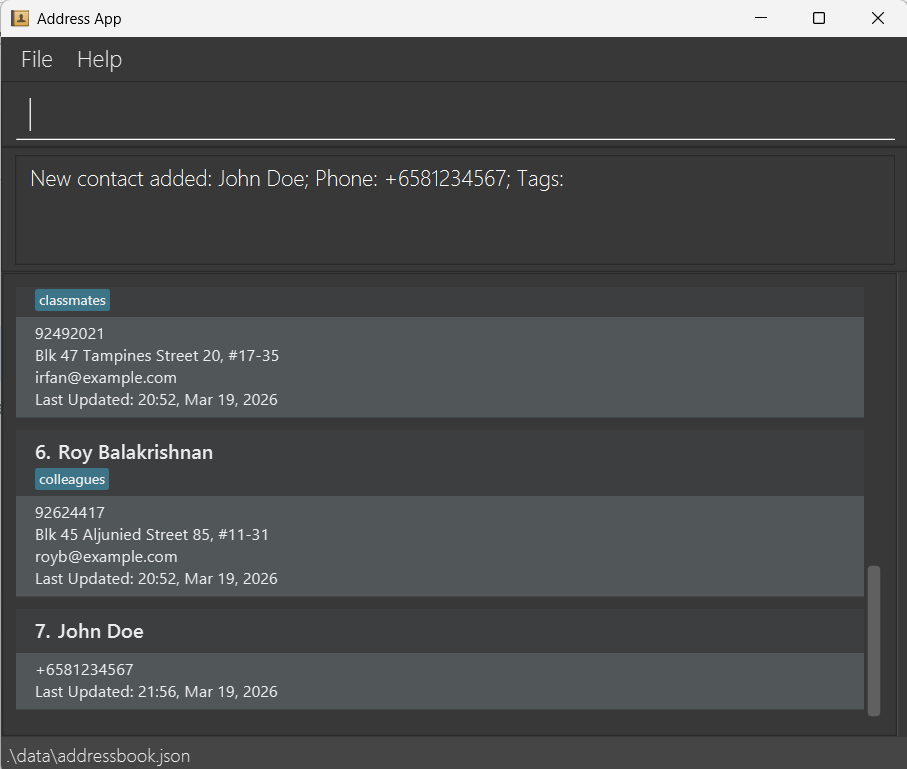
After a successful add command, the contact list will be reset to display every contact in the default sort order, then if there are similar contacts in the list, the contact list will be displayed to display the similar contacts.
A contact is similar if: